

There is a wide performance gap between companies that use Salesforce Marketing Cloud (SFMC) and companies that use it well. The platform difference is zero — both groups have access to the same tools, the same Journey Builder canvas, the same AMPscript engine, the same deliverability infrastructure. What separates them is discipline: in how they structure their data, how they design journeys, how they test, and how they govern the platform over time.
This guide covers the operational and technical Salesforce Marketing Cloud best practices that consistently separate high-performing SFMC teams from average ones — drawn from working across dozens of SFMC accounts at every maturity level.
SFMC Data Architecture: The Foundation Everything Runs On
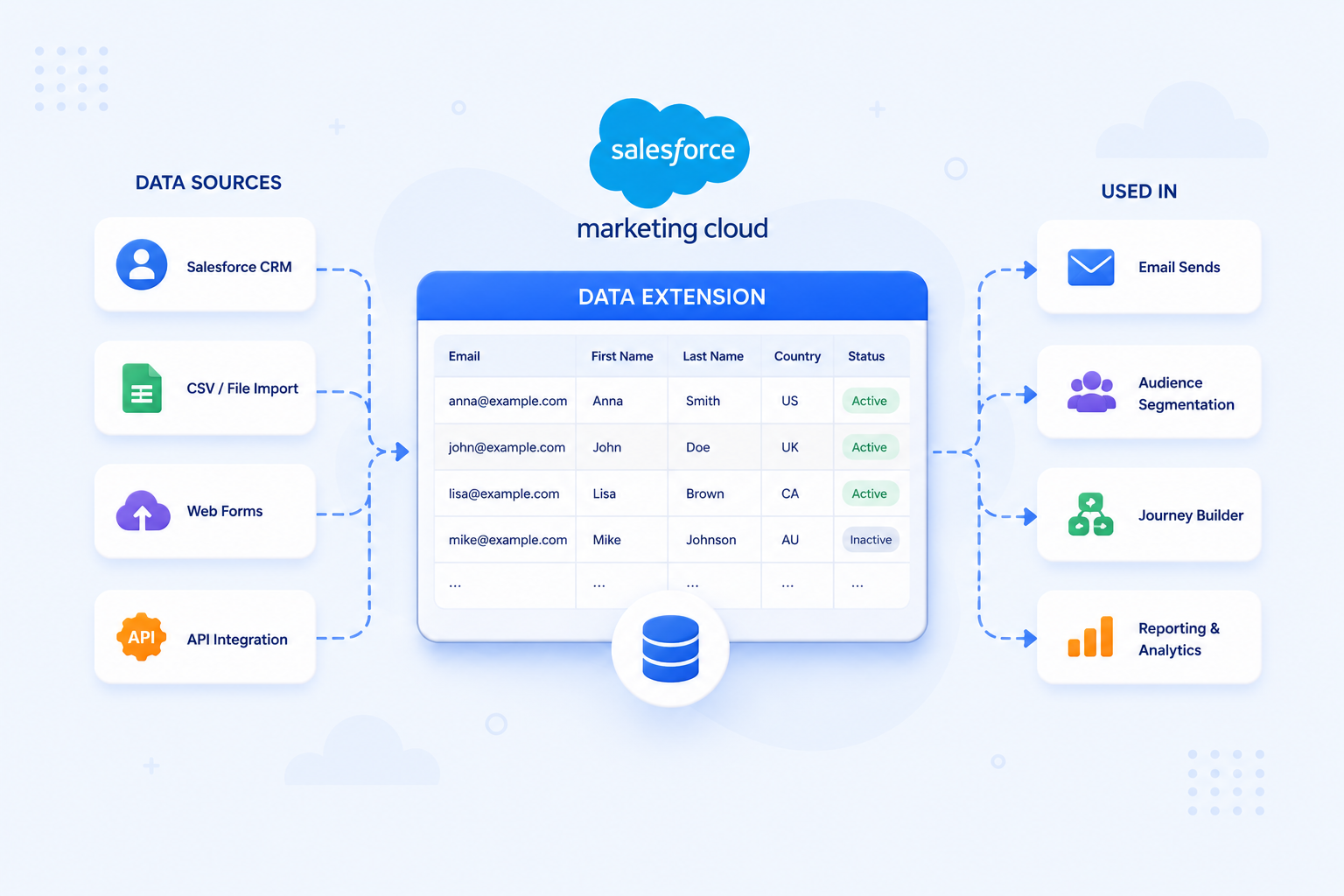
- Use a single canonical contact model. Map your SFMC subscriber key to a persistent customer ID from your CRM or CDP — not an email address. Email addresses change; a customer ID does not.
- Design data extensions for query performance. Avoid storing everything in one flat table. Segment transactional, behavioural, and profile data into separate extensions with clear relational joins.
- Automate your data imports. Manual CSV uploads create data freshness risk and human error. Scheduled automations via SFTP or API ensure your segmentation always runs on current data.
- Enforce suppression list hygiene weekly. Hard bounces, unsubscribes, and complaint records should be audited and reconciled on a fixed schedule — not on a when-we-remember basis.
Journey Builder: Stop Thinking in Sends, Start Thinking in Triggers
The most common Journey Builder mistake is building journeys that mirror batch campaign logic — a welcome series that sends on day 1, day 4, and day 7 regardless of what the customer does in between. High-performing teams build journeys where every subsequent message is conditional on the previous message’s engagement outcome.
Build decision splits after every send — click goes to a conversion journey, open-no-click gets a reformulated message, no-open gets a subject line variant. The logic is simple to build in Journey Builder; the gap is in design discipline.
AMPscript and Dynamic Content: Personalization That Actually Moves Metrics
Open-rate personalization — inserting a first name into a subject line — has been table stakes for a decade. The SFMC teams seeing meaningful revenue lift are using AMPscript for conditional content blocks, product recommendation rendering from live API calls, and loyalty or account data pulled directly from data extensions at send time.
A practical example: an e-commerce retailer uses AMPscript to render a different hero image, headline, and CTA based on which product category a subscriber last purchased from, cross-referenced with their loyalty tier. The same template produces effectively 18 different emails — that is the kind of personalization that drives measurable conversion lift rather than cosmetic customisation.
Deliverability: The Invisible Variable in SFMC Performance
Deliverability is the single most neglected discipline in Salesforce Marketing Cloud operations. Most teams only pay attention to it when something breaks — a sudden open rate drop, a spam complaint spike, a major inbox provider diverting sends to junk. By that point, reputation damage has already occurred and recovery takes weeks.
Best practice is to monitor sender reputation proactively. Track your SAP domain reputation via Google Postmaster Tools, watch bounce rate trends by ISP, and suppress low-engagement contacts from primary sends rather than continuing to mail them.
Email accessibility is also part of deliverability — accessible emails consistently see higher engagement rates. See our email accessibility services →
Salesforce Marketing Cloud Governance: The Practice That Protects Every Investment
Without governance, an SFMC account becomes progressively harder to maintain. After 18 months of ungoverned operation, most accounts have hundreds of abandoned journeys in an Active state, data extensions with undocumented purposes, and email templates that nobody is confident enough to delete. This is not a platform problem — it is an operations problem.
Establish naming conventions on day one, run a quarterly account audit to archive unused assets, and assign platform ownership to a named individual or team. These practices cost almost nothing in time but compound into significant operational resilience over a multi-year SFMC engagement.
Conclusion
Salesforce Marketing Cloud rewards discipline more than any other enterprise marketing platform. The gap between good and great SFMC performance is not found in the feature set — it is found in how consistently teams apply structured practices around data, journey design, personalization, deliverability, and governance. Adopt these Salesforce Marketing Cloud best practices systematically, and SFMC becomes the compounding growth engine it was designed to be — if you want an outside perspective on where your setup stands, get in touch.