
What Is Salesforce Journey Builder?
Salesforce Journey Builder is the customer journey orchestration tool inside Salesforce Marketing Cloud. It lets you design, automate, and optimise multichannel communication sequences that respond to individual customer behaviour — not just send scheduled batch emails to a list.
If you have ever wanted your marketing to feel less like broadcasting and more like a conversation that adapts based on what each customer actually does, Journey Builder is the tool that makes that possible at scale.
What Journey Builder Does
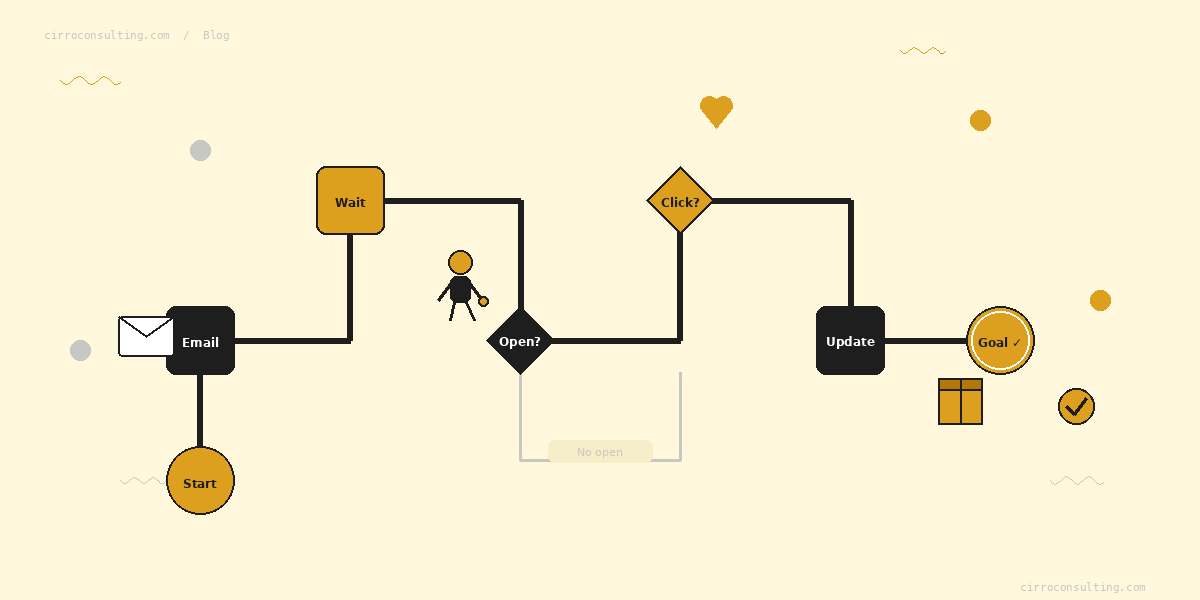
Journey Builder sits on a visual canvas where you map out the paths a customer takes through a communication sequence. Each path can branch based on data attributes, engagement behaviour, or real-time events — so two subscribers who enter the same journey can have completely different experiences depending on their actions.
At its core, Journey Builder does four things:
- Orchestrates multichannel communication — email, SMS, push notifications, advertising audiences, and CRM tasks from a single canvas
- Responds to customer behaviour — sends are triggered by what a customer does, not just when a schedule fires
- Routes contacts dynamically — decision splits direct contacts down different paths based on data or engagement
- Measures against outcomes — journey goals track when contacts achieve a defined result and exit them automatically
Key Components of Journey Builder
Journey Canvas
The visual interface where you build journeys. Activities — sends, waits, splits, updates — are added as blocks and connected to define the flow. Every path is visible at a glance, making complex multi-step sequences easier to design and audit.
Entry Sources
How contacts enter the journey:
- Data Extension — contacts enter when they appear in a specified data extension, on a schedule or in real time
- API Event — an external system triggers entry in real time (e-commerce platform, mobile app)
- Salesforce CRM Event — a CRM record change triggers entry (lead status update, opportunity stage change)
- CloudPages Form — a form submission on a Marketing Cloud landing page triggers entry
Journey Activities
- Email, SMS, Push — send a message across any configured channel
- Wait — hold contacts for a fixed duration, until a date, or until a specific time
- Decision Split — route contacts down different paths based on data attributes
- Engagement Split — route contacts based on email open or click behaviour
- Update Contact — write a value back to a contact record or data extension
- Salesforce Activity — create a task, update a lead, or trigger a flow in Salesforce CRM
Goals and Exit Criteria
A journey goal defines what success looks like — a purchase, a form completion, a loyalty enrolment. When a contact meets the goal, Journey Builder exits them automatically so they do not continue receiving messages that are no longer relevant.
How Journey Builder Works: A Real Example
A post-purchase journey for an e-commerce retailer:
Entry: Customer makes their first purchase. The order system fires an API Event to Journey Builder immediately.
Day 0: Order confirmation email sends on entry.
Day 3: Wait 3 days, then send a product care email personalised with the specific item purchased using AMPscript.
Day 7: Engagement Split checks whether the Day 3 email was opened. — Opened → send a complementary product recommendation — Did not open → resend with a different subject line
Day 14: Decision Split checks loyalty tier. — Gold or Silver → early access offer for the next sale — No tier → loyalty programme invitation
Goal: Contact makes a second purchase within 30 days — exits the journey automatically when achieved.
One journey. Multiple paths. Every contact gets a sequence that responds to their specific behaviour and data.
Journey Builder vs Automation Studio
| Journey Builder | Automation Studio | |
|---|---|---|
| Triggered by | Customer behaviour or event | Schedule or file drop |
| Primary purpose | Customer-facing communication | Backend data processing |
| Decision logic | Yes — splits, waits, goals | No |
| Multichannel sends | Yes | Email only |
| SQL queries | No | Yes |
| Data import/export | No | Yes |
Use Journey Builder when you want to respond to what a customer does. Use Automation Studio when you need to process data, run SQL queries, or schedule recurring sends.
The two tools work best together — Automation Studio prepares and segments the data, Journey Builder acts on it. For a full breakdown, see the Automation Studio vs Journey Builder guide.
Common Journey Builder Use Cases
- Welcome and onboarding — triggered on sign-up, guides new subscribers through your brand over 7–30 days
- Post-purchase follow-up — order confirmation, product education, cross-sell, and review requests
- Re-engagement — triggered when a contact has not engaged in 60–90 days, attempts reactivation before suppression
- Abandoned cart recovery — triggered by a browse or cart event, sends a recovery sequence with increasing incentive
- Renewal and retention — triggered by subscription expiry dates, drives renewal before lapse
Conclusion
Salesforce Journey Builder moves marketing from scheduled batch communication to real-time, behaviour-driven engagement. The teams getting the most from it are those who invest in the data architecture and segmentation logic that feeds it — Journey Builder executes the journey, but the quality of the experience depends on the data behind it.
For a practical walkthrough of building personalised journeys with dynamic content, the dynamic content in SFMC guide covers the full build process. If you want help designing or auditing a Journey Builder journey, get in touch →
References: Journey Builder — Salesforce Help Sales and Service Cloud Activities in Journey Builder — Salesforce Help