
The data model is the foundation of everything in Salesforce Marketing Cloud. Get it right early, and the platform scales cleanly. Get it wrong, and you accumulate technical debt that is difficult to fix once live sends have started.
This article covers the key decisions and steps involved in designing an SFMC data model, with enough detail to understand the scope, and to know when to bring in specialist support.
What a Data Model Means in SFMC
In SFMC, a data model is not just a set of data extensions. It encompasses:
- How contact data is structured and related in Contact Builder*
- The subscriber key strategy that identifies contacts across channels
- The relationships between data extensions: cardinality, primary keys, and link fields
- Which data extensions are sendable and how they connect to the contact model
- How data flows into and out of the platform via imports, API, and Automation Studio
Every decision at this layer affects segmentation, personalisation, journey entry, and deliverability. Changes are significantly harder to make after the platform is live.
Step 1: Define Your Subscriber Key Strategy
The subscriber key is the single most important decision in your data model. In SFMC, Contact Builder uses a single contact key to identify each contact. This value is identical to the subscriber key in Email Studio. (Salesforce Help)
The correct approach: use a stable, system-generated ID from your CRM or source system.
What to avoid and why:
- Email address as subscriber key: email addresses change; the same person may appear across channels with different addresses, creating fragmented contact records that are difficult to consolidate
- Number-type fields: use a string-based field even if the source system stores the identifier as a number. SFMC handles string keys more reliably across integrations
- Inconsistent identifiers across systems: the contact key must be the same value in every data source feeding SFMC: CRM, e-commerce platform, loyalty system, and any API integration
Important: changing the subscriber key after live sends have gone out requires a full contact model rebuild. This decision must be made before you build anything else.
Step 2: Map Your Data Sources
Before creating any data extension, map every data source that will feed SFMC. Salesforce recommends listing all data from all potential sources, selecting a system of record, and determining what data needs to flow in and out of Marketing Cloud before building anything. (Salesforce Trailhead)
For each data source, identify:
- Owner: which team or system owns and maintains this data
- Update frequency: real-time via API, daily batch, weekly file drop
- Volume: approximate record count and number of fields
- Key field: which field maps to your subscriber key
This mapping exercise surfaces conflicts early. For example, two systems using different identifiers for the same contact, before they become data model problems.
Step 3: Define Your Core Data Extensions
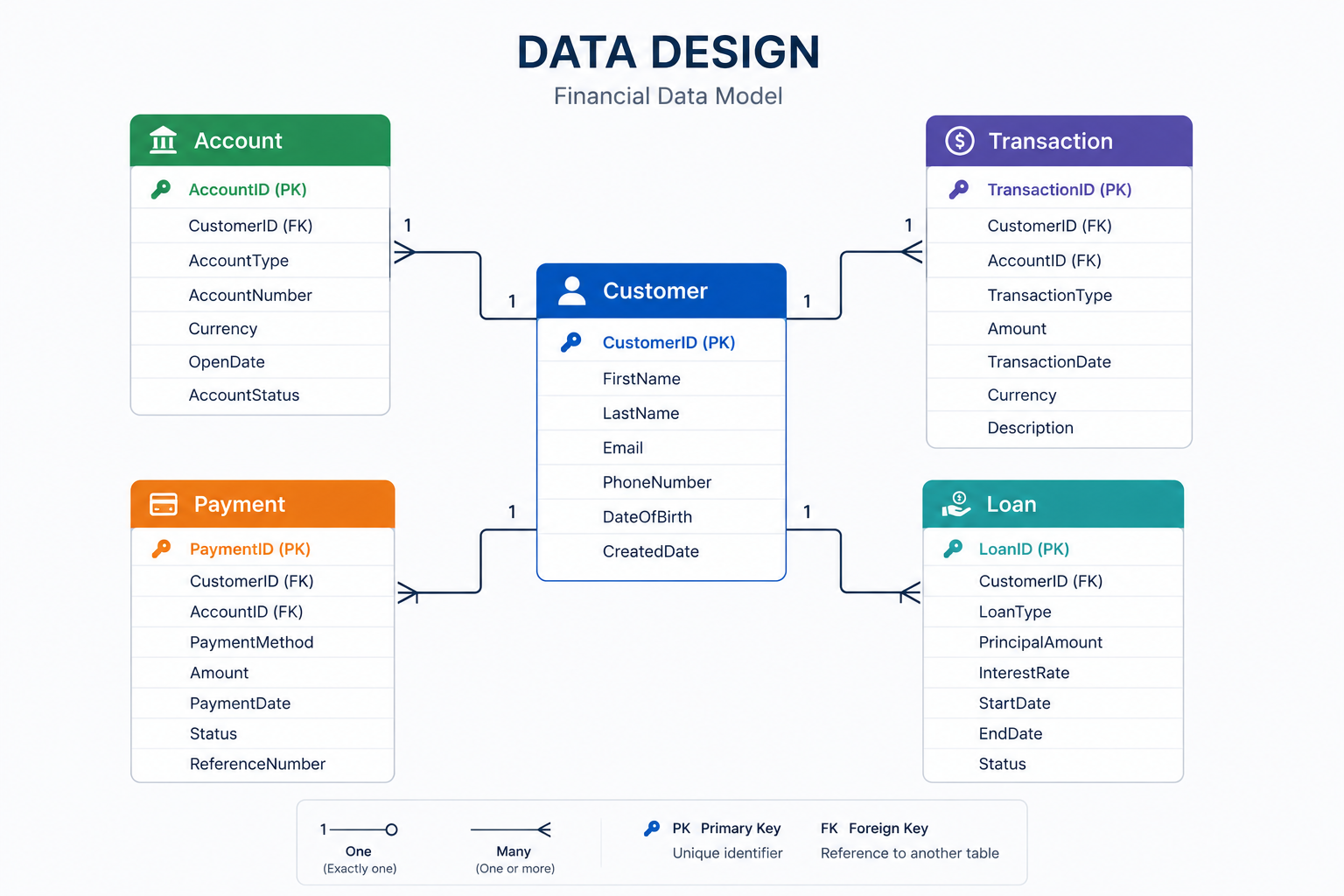
Group data extensions by function rather than by campaign. A clean data model typically includes:
- Contact or subscriber DE: the master sendable record containing email address, subscriber key, and core demographic attributes
- Transactional DEs: orders, events, bookings, or interactions, typically one-to-many with the contact record
- Preference DEs: opt-in status, channel preferences, and communication frequency settings
- Lookup tables: product catalogues, tier definitions, reference data used in AMPscript* personalisation. Non-sendable.
- Suppression DEs: global exclusions, hard bounces, and unsubscribed contacts maintained separately from the main audience
Each data extension needs a defined primary key, a clear naming convention, and a documented purpose. Salesforce Trailhead recommends standardising naming conventions across platforms before importing any data. (Salesforce Trailhead) Data extensions without clear ownership and naming conventions multiply quickly and become difficult to audit.
Step 4: Set Up Relationships in Contact Builder
Once your data extensions are defined, link the sendable ones into the contact model via Contact Builder’s Data Designer. Attribute groups connect related data extensions to the contact record and define how SFMC joins data when building audiences or personalising content. (Salesforce Trailhead)
For each relationship, you need to define cardinality:
- 1:1: each contact has one record in the linked DE; used for profile or demographic data
- One-to-many: one contact maps to multiple records; used for transactional or event data
- Many-to-many: multiple records in each DE relate to multiple records in the other; used for complex relational data
Salesforce recommends reserving populations for specific use cases such as field-level encryption or API entry sources in Journey Builder. For most implementations, a single population is sufficient. (Salesforce Help)
Link subscriber data into the contact model before running any imports. This ensures the subscriber’s primary key matches the contact’s primary key from the start.
Step 5: Plan Your Data Flows
A data model is not static. Define how data enters and updates SFMC on an ongoing basis:
- Automation Studio file imports:* for batch data from external systems via SFTP, typically daily or nightly
- REST API: for real-time data updates triggered by customer events: purchases, sign-ups, status changes
- Marketing Cloud Connect:* for data syncing directly from Salesforce CRM
For each data flow, define the update method (overwrite or append), the schedule or trigger, and the data extension it writes to. Also set data retention policies on intermediate and staging data extensions to prevent unnecessary data accumulation.
Common Data Model Mistakes
- Using email address as the subscriber key: causes fragmented contact records when email addresses change or a contact appears across multiple channels
- No primary key on data extensions: without a primary key, duplicate records accumulate and upserts fail silently
- Building data extensions before defining the contact model: data extensions built without a clear model are difficult to link correctly after the fact
- No naming convention: data extensions proliferate quickly; without consistent naming, identifying what is active, what is staging, and what is safe to delete becomes a significant audit effort
- No data retention policy on intermediate DEs: staging tables used in Automation Studio workflows accumulate records indefinitely without retention settings, increasing query times and storage costs
- No suppression DE from the start: hard bounces and unsubscribes need somewhere to go before the first send; building suppression logic after go-live means some sends have already gone to contacts they should not have
A Practical Starting Point
Before building anything in SFMC, work through these questions:
- What is your subscriber key, and is it consistent across all source systems?
- What are your data sources, who owns them, and how frequently do they update?
- Which data extensions need to be sendable, and what is the send relationship for each?
- What is your naming convention for data extensions, attribute groups, and automations?
- What data retention policy applies to each data extension type?
The answers shape every build decision that follows. There is no universally correct data model. Every business has unique needs, but the questions above are universal starting points.
Going Deeper
- Salesforce Marketing Cloud Contact Builder and Data Extensions: Understanding the Relationship
- What Is a Data Extension in Salesforce Marketing Cloud?
- How Long Does Salesforce Marketing Cloud Implementation Take?
- Design Your Data Model: Salesforce Trailhead
Designing an SFMC data model for the first time, or rebuilding one that is not performing? Talk to our team.
Glossary
AMPscript: Salesforce Marketing Cloud’s proprietary scripting language used to personalise email and landing page content at the individual level by pulling values from data extensions or system attributes.
Attribute group: a collection of linked data extensions in Contact Builder that share a defined relationship with the contact record. Attribute groups tell SFMC how to join data when building audiences or personalising content.
Automation Studio: a workflow tool in SFMC used to schedule and sequence backend data activities, including file imports, SQL queries, and data exports.
Cardinality: the relationship type between a data extension and the contact record in Contact Builder. The main types are 1:1, one-to-many, and many-to-many.
Contact Builder: the SFMC tool used to define and manage the contact data model, including contact relationships, attribute groups, and linked data extensions.
Data retention policy: a setting on a data extension that defines how long records are kept before being automatically deleted. Essential for intermediate and staging data extensions used in automation workflows.
Marketing Cloud Connect: the native Salesforce integration that syncs contacts, leads, and campaign data between SFMC and Sales Cloud or Service Cloud.
Primary key: a field or combination of fields that uniquely identifies each record in a data extension. Required for upsert operations and essential for preventing duplicate records.
Sendable data extension: a data extension linked to the SFMC contact model via a send relationship, enabling it to be used as an audience for email, SMS, or journey entry.
Subscriber key: a unique identifier used by SFMC to identify individual contacts across the platform and across channels. Should be a stable, system-generated ID rather than an email address.
Suppression data extension: a data extension used to store contacts who should be excluded from sends, typically hard bounces, global unsubscribes, or business-defined exclusions.