

Salesforce Marketing Cloud is powerful on its own. But the organisations getting the most out of it are the ones that have connected it properly to the rest of their technology stack.
Without the right integrations, SFMC operates in a silo: your CRM data stays separate, your paid media runs on stale audiences, and your team has limited visibility into what is actually happening. With the right connections in place, SFMC becomes the central hub of your marketing operation.
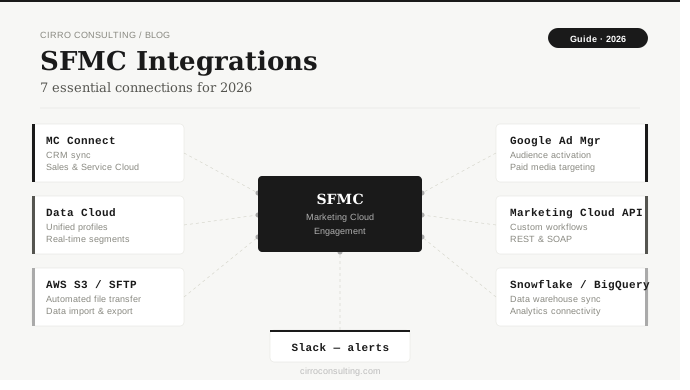
This guide covers the 7 most impactful SFMC integrations: what they do, when to use them, and where teams most commonly go wrong.
Quick Reference
| Integration | Best for | Complexity | Primary benefit |
|---|---|---|---|
| Marketing Cloud Connect | Marketers, Admins | Medium | Sync CRM data bidirectionally |
| Salesforce Data Cloud | Architects, Marketers | High | Unified real-time customer profiles |
| Google Ad Manager | Performance Marketers | Medium | First-party audience activation |
| Marketing Cloud API | Developers | High | Custom workflows and data sync |
| Slack | Marketing Ops | Low | Internal journey notifications |
| AWS S3 / SFTP | Admins, Data Engineers | Medium | Automated file-based data transfer |
| Snowflake / BigQuery | Data teams, Architects | High | Data warehouse connectivity |
1. Marketing Cloud Connect: Sync SFMC with Salesforce CRM
Best for: Marketing Managers, SFMC Admins
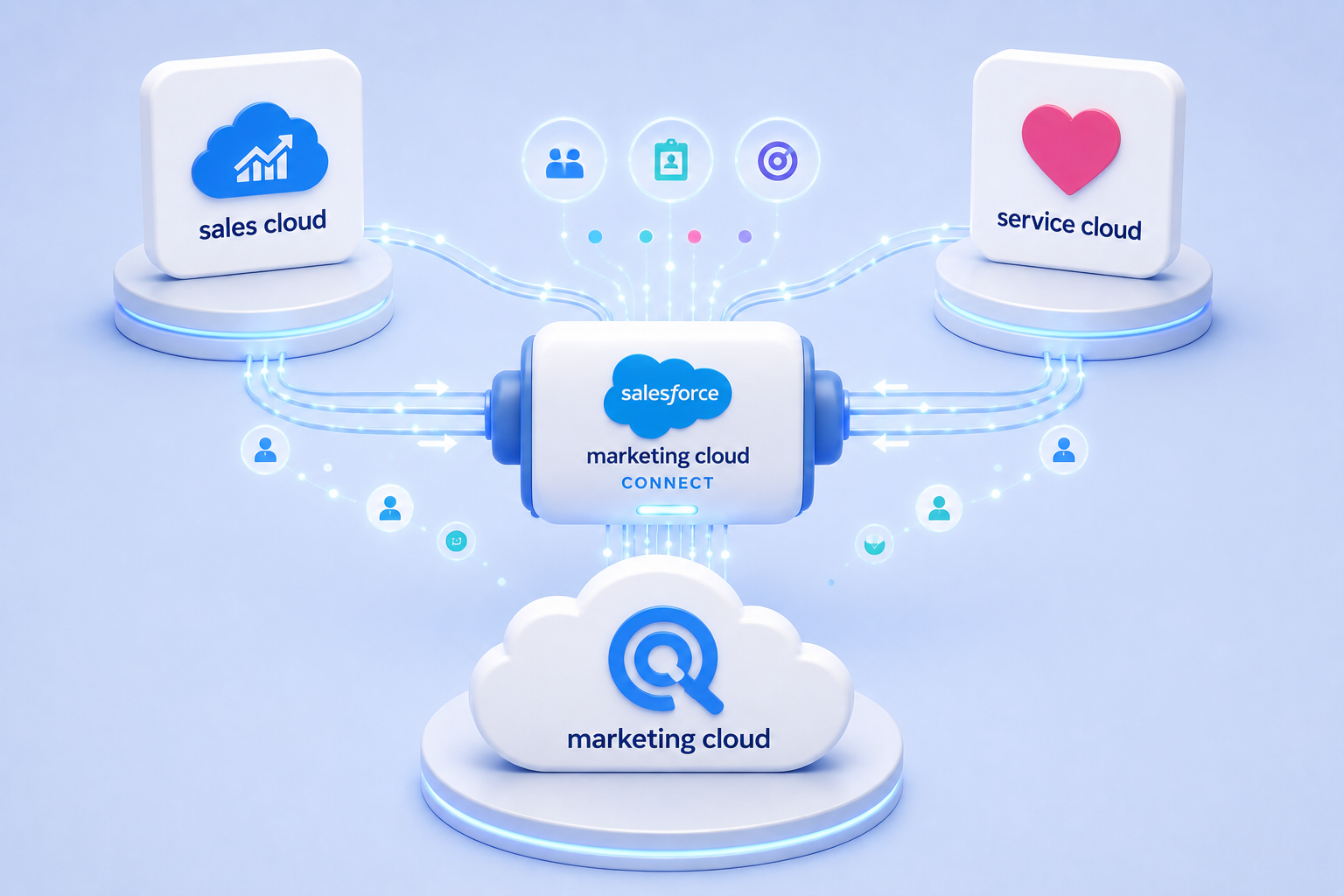
Marketing Cloud Connect* is the native bridge between SFMC and Salesforce CRM (Sales Cloud or Service Cloud). For any organisation running both platforms, this is the foundational integration.
It enables contact records, leads, campaigns, and opportunities to flow bidirectionally, so your journeys can respond to real CRM events rather than operating on delayed exports.
Key use cases:
- Trigger onboarding journeys when a lead is converted in Sales Cloud
- Send win-back campaigns when an opportunity moves to Closed Lost
- Sync opt-out status between platforms for compliance
- Surface email engagement data inside Salesforce CRM records
Common pitfalls: Permission mismatches between the API user and CRM profiles cause silent sync failures. Always verify field mapping for opt-out data before any live send. This is a compliance risk, not just a technical one.
Misconfigured Marketing Cloud Connect is one of the most common causes of deliverability issues and data inconsistencies. If you are unsure whether your CRM-to-SFMC sync is set up correctly, talk to our team.
2. Salesforce Data Cloud: Unified Customer Profiles at Scale
Best for: Marketing Architects, Senior Marketers
Data Cloud* (formerly Salesforce CDP) unifies customer data from multiple sources (CRM, website, mobile app, commerce platform, offline channels) into a single real-time profile per individual.
When connected with SFMC, it enables personalisation at scale: instead of segmenting from a single data source, you activate unified behavioural and transactional data directly in journeys.
Key use cases:
- Build dynamic segments from real-time behavioural signals
- Suppress recently converted customers from acquisition campaigns automatically
- Enrich journeys with calculated insights like predicted lifetime value or churn score
- Power Einstein AI features with more complete data
Common pitfalls: Identity resolution takes time to stabilise. Do not activate segments to live campaigns until resolution rules have been running for at least 2 to 4 weeks. Also confirm your Data Cloud licensing scope before building activation workflows. Segment activation to SFMC may require a specific entitlement.
3. Google Ad Manager: Extend SFMC Audiences to Paid Media
Best for: Performance Marketers, Media Planners
This integration connects Salesforce Data Cloud audience segments directly to Google Ad Manager, allowing your first-party CRM and behavioural data to power programmatic advertising.
The same segments driving your email journeys can suppress existing customers from acquisition spend, or retarget lapsed users across the Google ecosystem.
Key use cases:
- Push high-value customer segments to Ad Manager for lookalike modelling
- Suppress existing customers from brand awareness campaigns
- Retarget users who opened an SFMC email but did not convert
- Coordinate cross-channel messaging within the same campaign
Common pitfalls: Google Ad Manager enforces minimum audience sizes. Very small or highly specific segments may not activate. For European audiences, ensure your consent framework explicitly covers advertising use cases before syncing any data.
4. Marketing Cloud API: Custom Integrations
Best for: SFMC Developers, Integration Architects
SFMC exposes both REST and SOAP APIs*, enabling development teams to integrate with virtually any internal or third-party system. This is the path for organisations with unique data pipelines, proprietary platforms, or requirements no native connector addresses.
Key use cases:
- Trigger transactional sends via REST API when a customer completes a purchase
- Automate nightly data extension* upserts from an internal data warehouse
- Build custom suppression list management workflows
- Connect SFMC to a loyalty or commerce platform
Common pitfalls: SFMC enforces API rate limits that can disrupt high-volume integrations. Design your architecture to batch requests. Some objects are REST-only and others are better handled via SOAP; knowing which to use before building saves significant rework. Never use your admin user for API calls in production.
API architecture decisions made early in a project are difficult to reverse. If you are building a custom SFMC integration, talk to our team before you start.
5. Slack: Internal Notifications from Journey Events
Best for: Marketing Ops, Campaign Managers
A simple but practical integration: connect SFMC to Slack via webhook to receive real-time internal notifications when key journey or automation events occur. Low effort, immediate operational value.
Key use cases:
- Alert the team when a high-priority journey send completes
- Notify ops when an Automation Studio* job fails
- Send a daily deliverability metrics digest to a dedicated channel
- Trigger an approval notification when a journey draft is ready for review
Common pitfalls: Do not hardcode webhook URLs in journey configurations. Store them as reference data so they can be updated without modifying the journey itself. This integration is for operational visibility, not customer communications.
6. AWS S3 / SFTP: Automated Data Imports and Exports
Best for: SFMC Admins, Data Engineers
SFMC Automation Studio supports native file transfers via SFTP and, with configuration, AWS S3. This pattern is one of the most widely used in enterprise SFMC environments: external systems drop files to a designated location, Automation Studio picks them up on schedule, and data extensions update automatically.
It is not the most sophisticated integration, but it is reliable, well-understood, and requires no custom development.
Key use cases:
- Nightly import of customer transaction data from an ERP system
- Export of engagement logs to a data warehouse for BI reporting
- Automated suppression list updates from a preference centre
- Daily sync of product catalogue data for dynamic email content
Common pitfalls: File naming conventions must be exact and consistent. Any deviation from the expected pattern causes silent import failures. Always include a File Transfer Activity before the Import Activity to verify file readiness.
7. Snowflake / BigQuery: Data Warehouse Connectivity
Best for: Data Architects, Analytics Teams
For organisations with a modern data stack, connecting SFMC to Snowflake or Google BigQuery enables bidirectional data flows between your marketing platform and your central analytics infrastructure, typically via Salesforce Data Cloud or a middleware tool like MuleSoft or Fivetran.
Key use cases:
- Push SFMC engagement data into Snowflake for unified reporting across business units
- Pull predictive scores or ML model outputs from BigQuery into SFMC for segmentation
- Maintain a single source of truth for customer data across marketing, sales, and analytics
- Enable self-service audience building for data analysts without SFMC access
Common pitfalls: SFMC engagement data is not real-time. Expect a lag of several hours. Plan your pipeline architecture accordingly. For large sending volumes, engagement log exports can be substantial; factor in warehouse storage and compute costs from the start.
Which Integrations Do You Actually Need?
Not every organisation needs all seven. A practical starting point:
- Running Salesforce CRM: Marketing Cloud Connect first, always
- Investing in personalisation at scale: Data Cloud is the next step, but plan carefully before committing
- Running paid media alongside email: Google Ad Manager integration maximises your first-party data investment
- Have custom internal systems: the Marketing Cloud API gives you the flexibility to connect anything
- Need operational visibility: Slack notifications are low-effort and immediately useful
The worst outcome is implementing integrations without a clear use case. Each connection adds complexity and maintenance overhead. Build with intention, document your architecture, and always test in a sandbox before deploying to production.
Related Reading
- Marketing Cloud Connect Explained: How It Works and Its Limitations
- How to Improve Email Deliverability in SFMC
- Automation Studio vs Journey Builder: When to Use Each
- Using SQL in SFMC: With Examples
Not sure which integrations to prioritise for your SFMC setup? Talk to our team.
Glossary
Automation Studio: a workflow tool in SFMC used to schedule and sequence backend data activities, including SQL queries, file transfers, and data imports. Used for automated file-based integrations via SFTP or AWS S3.
Data Cloud: Salesforce’s customer data platform (CDP), which unifies data from multiple sources into a single real-time customer profile. When connected to SFMC, it enables real-time audience activation into Journey Builder and Einstein AI features.
Data extension: a table in SFMC used to store subscriber data or campaign-related information. API integrations typically write data into data extensions to update contact attributes or trigger journey entry.
Marketing Cloud Connect: the native Salesforce integration that syncs contacts, leads, campaigns, and engagement data between SFMC and Sales Cloud or Service Cloud. The foundational integration for organisations running both platforms.
REST API / SOAP API: two API protocols supported by SFMC for custom integrations. REST is used for most modern integrations including triggered sends and data extension operations. SOAP is used for certain legacy operations and subscriber management. Knowing which to use before building saves significant rework.
SFTP (Secure File Transfer Protocol): a secure file transfer method used to exchange files between external systems and SFMC. Import File and File Transfer Activities in Automation Studio both interact with SFMC’s built-in SFTP location.